

September 22, 2026 •Network Solutions
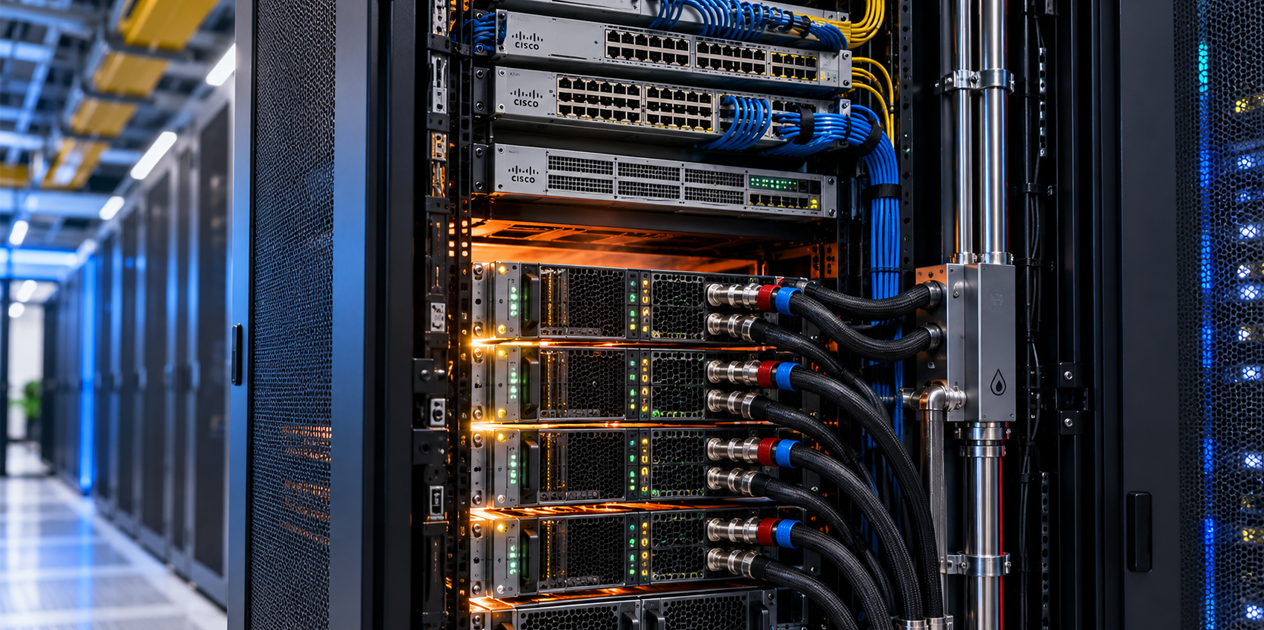
AI infrastructure conversations tend to focus on GPUs, high-speed networking, storage and the applications organizations hope to run.
There is another question that needs to be asked early:
Can you reliably power and cool the technology you're planning to deploy?
For years, power and cooling could remain somewhat in the background of many network infrastructure projects. A new switch, server or appliance went into a rack, available power was confirmed, airflow was checked, and the project moved forward.
AI and accelerated computing are changing those assumptions.
More computing capability is being concentrated into individual racks. That means more electrical demand and considerably more heat in the same physical footprint. Vertiv estimates that AI workloads can require approximately five times the power and cooling capacity of traditional servers occupying comparable space.
For IT teams, power and cooling are becoming an even bigger part of the technology planning conversation.
Think about a typical network or server room.
The racks may contain switches, routers, firewalls, storage, servers, wireless controllers and other infrastructure. Over time, equipment gets refreshed and additional technology is added. Power and cooling requirements generally increase, but often at a manageable pace.
Accelerated computing can change the scale.
GPU systems designed for AI can consume substantially more power than conventional servers. Vertiv's current AI reference designs illustrate the range: air-cooled designs include rack densities from roughly 20 to 60 kW, while newer high-density designs using liquid plus air cooling reach approximately 130–142 kW per rack.
That creates a simple but important distinction:
Having enough room in the rack doesn't mean you have enough capacity in the rack.
Before new AI infrastructure arrives, organizations need to understand how much power is available, how it's distributed and whether the environment can remove the heat the equipment will generate.
Power planning involves more than checking whether an outlet is available.
The electrical path supporting critical IT equipment can include utility power, UPS systems, battery capacity, power distribution and rack PDUs before electricity ever reaches a device.
Each part of that chain matters.
An organization may have sufficient overall electrical capacity but discover that a particular room, row or rack can't deliver what new equipment requires. There may also be enough power under normal conditions but insufficient capacity to maintain the desired level of redundancy during an outage or equipment failure.
AI adds another consideration: accelerated workloads can create significant changes in power demand.
Vertiv's AI reference-design guidance specifically calls for power and cooling buffers capable of handling AI workload surges, along with careful consideration of redundancy and available capacity.
This makes a power assessment an important step before deploying high-density infrastructure.
Almost all the electricity consumed by IT equipment ultimately becomes heat.
Put considerably more computing power into the same rack and considerably more heat needs to come out.
Traditional network and server environments have typically relied on air cooling. Cool air enters the equipment, internal fans move it across components, and heated air is exhausted and removed from the room.
That approach isn't disappearing.
In fact, Vertiv's current 360AI portfolio includes fully air-cooled reference designs at densities as high as 60 kW per rack. But as density increases, Vertiv's higher-density reference designs increasingly combine liquid and air cooling.
That doesn't mean every organization adopting AI suddenly needs liquid cooling.
It means cooling should be evaluated against the equipment being deployed rather than assuming the cooling that supported the previous generation of technology will support the next one.
Liquid can remove heat much more effectively than air, which is why direct-to-chip liquid cooling is increasingly associated with high-density GPU systems.
In a direct-to-chip design, liquid is circulated through cold plates attached to heat-producing components such as GPUs and CPUs. Heat is transferred into the liquid and carried away from the equipment.
But even a liquid-cooled AI system may still require air cooling.
Memory, power supplies, networking equipment and other components can continue rejecting heat into the surrounding environment. That's why many high-density designs are actually hybrid environments using both liquid and air cooling.
For example, one of Vertiv's NVIDIA Blackwell reference designs specifies 72% direct-to-chip liquid cooling and 28% perimeter air cooling.
For IT teams accustomed to thinking primarily about airflow, that represents an important change in infrastructure planning.
AI doesn't replace the network. It increases the importance of it.
Accelerated computing environments can create enormous amounts of east-west traffic between compute resources and storage. They also need connectivity to users, applications, cloud services and other business systems.
That means switches, optics, cabling and other network infrastructure may occupy the same increasingly dense environment.
Those devices consume power and produce heat too.
This is where network planning and power-and-cooling planning begin to intersect.
When evaluating an AI deployment, organizations should consider the entire rack or row, not simply the GPU systems being added.
How much power will all of the equipment consume? How will that power be distributed? What heat will the combined infrastructure produce? Where will switches be positioned? What airflow do they require? What happens as additional equipment is added?
Those are practical infrastructure questions that can prevent expensive surprises later.
There's another difference between supplying power and providing reliable power.
If AI becomes part of an important business process, an interruption to the infrastructure supporting it can become a business interruption.
UPS capacity, battery runtime, redundancy and power distribution therefore deserve the same scrutiny as available electrical capacity.
Cooling infrastructure may also become part of that resiliency discussion. In high-density environments, losing cooling while compute remains powered can quickly create problems. Vertiv's high-density AI reference designs include protected power for cooling components in addition to the IT load itself.
The objective isn't simply keeping equipment powered. It's keeping the environment required for that equipment to operate available.
Many organizations won't begin with a room full of GPU racks.
They may start with a small AI cluster, an edge inference application or a limited on-premises deployment.
That's exactly when power and cooling planning can be most valuable.
If the project succeeds, what happens next?
Additional GPUs may be added. Network capacity may increase. Storage may expand. A pilot may become a production platform supporting multiple business applications.
Understanding available power, cooling and rack capacity today gives IT teams a clearer picture of how far the environment can grow before additional infrastructure is required.
This is the problem Vertiv has been designing its AI infrastructure portfolio around.
Vertiv 360AI brings together critical power, power distribution, air cooling, liquid cooling and supporting services for accelerated computing environments. The portfolio includes configurations ranging from edge inference and smaller retrofit projects to extremely high-density AI deployments.
Importantly, the portfolio isn't built around a single assumption that every AI deployment requires the same infrastructure.
Vertiv currently publishes air-cooled, liquid-cooled and hybrid reference designs across a wide range of rack densities. That provides organizations with different paths depending on the equipment they're deploying, their existing infrastructure and where they expect the environment to grow.
AI may change what organizations ask their networks to do. It can also change what those networks and the computing infrastructure around them require from the physical environment.
Before adding high-density AI infrastructure, understand the complete requirement: networking, power, power protection, distribution and cooling.
Network Solutions works with organizations to design and support the network infrastructure behind modern workloads, and as a Vertiv partner, we can also help address the critical power and cooling requirements that come with increasingly dense IT and AI environments.
Planning an AI infrastructure project or wondering whether your current environment has the power and cooling capacity to support what's next? Complete the form below to start a conversation with Network Solutions.